
Your database is about to work for you.
Your past clients. A new reason to reconnect. A HELOC invitation from you gives them a way to explore their equity while keeping the first mortgage you helped them secure.
Two short emails over two weeks, built, reviewed and sent by corporate at no cost to you. Every reply and every call comes straight to you.
Email 1 begins [Email 1 date]
Internal campaign guide. Not for borrower distribution.
Your email. Your landing page. Your relationship.
Supplied concept artwork; final approved materials may differ.
Sent from you.
Your name, email and NMLS. Replies land in your inbox. Calls ring your phone.
No work to send it.
Corporate handles the copy, design, review and send. You handle the conversations.
Keeps the first mortgage.
A separate line of credit alongside their existing loan. A reason to reconnect without replacing it.
You see the activity.
Your recipients, opens, clicks and replies—all in Command Center.
Two emails. One easy next step.
A coordinated invitation and follow-up, with an AFN landing page that brings the conversation back to you.
A reason to reconnect.
A warm, personalized introduction to using home equity while keeping the first mortgage.
[Email 1 date] · Sent in daily batches
From you → AFN HELOC landing page
A timely reminder.
A second short email, only to clients who haven't responded to the first invitation.
About six days after Email 1
From you → The same landing page
A secure place to start.
Program details, your contact information and a secure application on AFN's platform.
Hosted by AFN
Explore the landing page →A familiar name in their inbox. Yours.
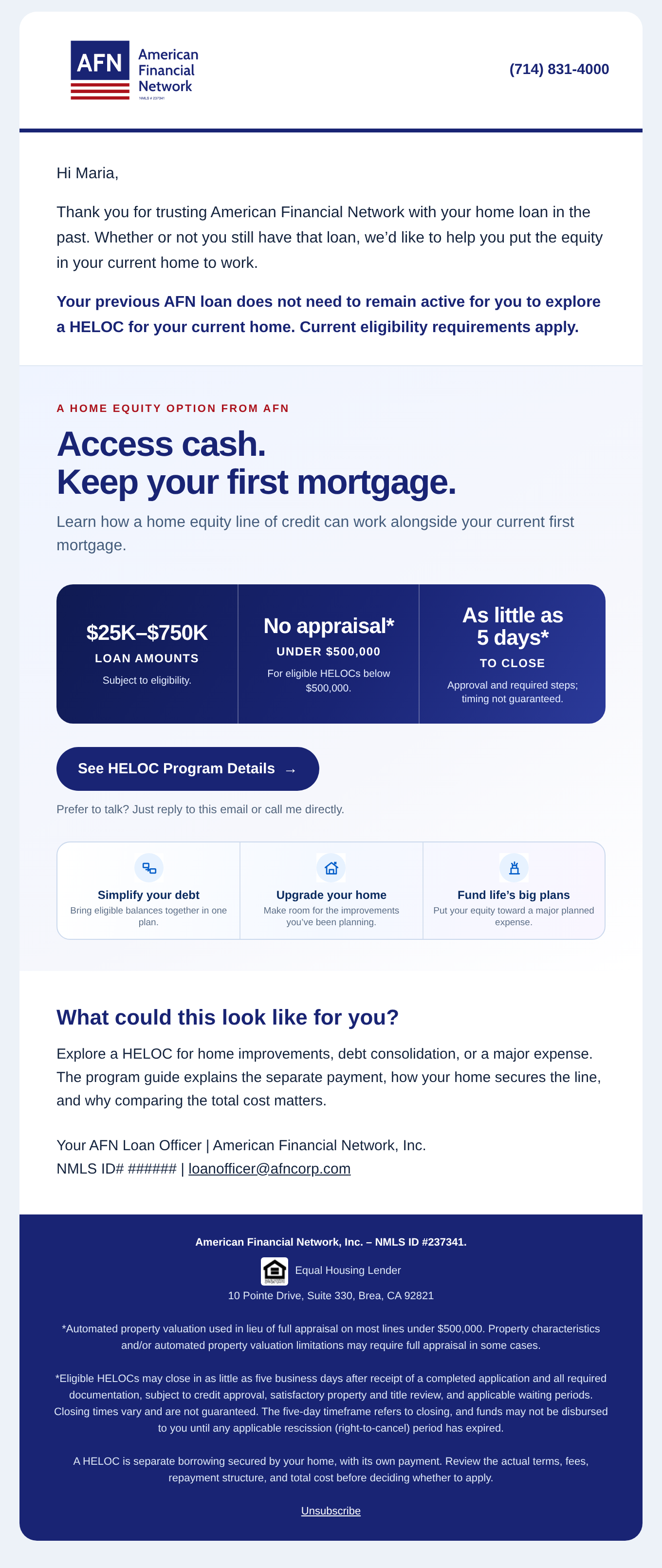
A plain, warm note from you: you helped with their mortgage, here's a way to explore the equity they've built, and here's a secure place to start.
- Personalized to your relationship. Their first name and closing date, plus your name, title, NMLS, phone and email.
- No numbers in the email. No rates, payments, home values, equity figures or loan amounts.
- One clear next step. “Start your secure application,” with the option to reply or call you instead.
- Your details, automatically. Your profile feeds the contact information, licensing and required disclosures.
Read Email 1: the invitation
Subject: [approved subject line]
Final Legal-cleared Email 1 copy will be placed here before publication.
Read Email 2: the follow-up
Subject: [approved subject line]
Final Legal-cleared Email 2 copy will be placed here before publication. Planned send: [Email 2 date], about six days after each recipient's first email.
AFN · HELOC program page
Access your equity.
Keep your first mortgage.
Explore a HELOC without refinancing your existing first mortgage. Start an application, or talk it through with your AFN loan officer.
[Your name] · [Your phone] · [Your email]
[Approved program information and required disclosures]
Illustrative layout; replace with the approved landing page screenshot.
An AFN experience. From click to conversation.
Your client sees a short explanation of the program, your name and contact information, and a Start your secure HELOC application button.
- Hosted by AFN. The application runs on AFN's secure platform.
- Connected to you. Your contact details give clients a direct way to reach their loan officer.
- Simple at launch. No rate or payment calculators.
Your funded past clients. Your existing relationships.
Clients are matched to you as the loan officer of record. The campaign uses the following inclusion and exclusion criteria.
Included
- Funded past clients tied to you as loan officer of record
- Open branches only
- One email per household
Not included
- Clients with a loan in process or an application started
- Recent closings and recent refinances
- Clients who already hold a HELOC with us
- Unsubscribed or do-not-contact clients
- Any client you ask us to leave off
You are the sender
- Your name and email are the sender and reply-to
- DBA logo where applicable
Find your list
Command Center → Marketing Campaign → [campaign name] → Contacts
You're in automatically. Make sure the responses reach you.
Three quick checks now. Better conversations when the campaign begins.
Check your contact info.
Open Paylocity and confirm your phone, email and NMLS. These feed the footer your clients will see. A wrong number means missed calls.
Look over your list.
Go to Command Center → Marketing Campaign → [campaign name] → Contacts. Review who will receive the campaign.
Be ready for the reply.
Skim the call guide and client FAQ so the first response doesn't catch you cold. Use the product card for anything with a number in it.
0 of 3 checks complete
Personal checklist only. It does not change your enrollment or submit updates to AFN.
Three questions. A confident conversation.
Keep the first answer simple, then turn to the product materials for your client's specifics.
“Is this a refinance?”
No. Your mortgage and its rate stay exactly as they are. This is a separate line of credit that sits alongside it.
“What's the rate?”
It's a variable line tied to Prime. Let me pull your specifics rather than guess.
“I already have a HELOC.”
Then this is about whether a replacement makes sense. Let's compare.
Product questions: [product contact] · Application or status questions: [application contact]
Your clients. Your campaign results.
Once your batch sends, open Command Center → Marketing Campaign → [campaign name] → Statistics to see sends, opens, clicks and replies for your clients only.
Marketing Campaign
[campaign name as shown in Command Center]
Your campaign activity appears here.
View your actual results in Command Center.
Screenshot placeholder · Replace with the actual Statistics tab.
The quick-reference guide.
| You want to… | Do this |
|---|---|
| See which clients are getting it | Command Center → Marketing Campaign → [campaign name] → Contacts |
| See opens, clicks and replies | Command Center → Marketing Campaign → [campaign name] → Statistics |
| Fix your phone, email or NMLS | Update Paylocity—it feeds the email footer. |
| Answer a product question | Use the product card and call guide. |
| Leave specific clients off | Submit the exclusion form by [close date]. |
| Have your clients sit this one out | Use Interim Rock by [close date] at [time] [TZ]. |
Prefer your clients sit this one out?
You're included automatically, and we hope you stay in—it's your name on it and the replies come to you. If you'd rather your clients not receive this campaign, you can remove them until [close date] at [time] [TZ]. One step covers both emails.
Remove all your clients from this campaign
- Open Interim Rock and sign in.
- [Exact menu and screen name to be confirmed]
- [Find the HELOC campaign and choose opt out—exact steps to be confirmed]
- Confirm and check for [status label].
Keep the campaign, but leave specific clients off
Use the client exclusion form by the same deadline: [close date] at [time] [TZ].
Changed your mind before the window closes?
[Re-enrollment instructions or Marketing contact to be confirmed.] After the window closes, the list is locked for this campaign.
Questions? commandcenterhelp@afncorp.com